Showing posts with label Cloud. Show all posts

Thursday, June 03, 2010

WSO2 Stratos: WSO2 Brings The Whole SOA Stack to The Cloud

WSO2 announced that the SOA stack that they provided as downloadable packages are now available in the cloud as hosted instances with the code name WSO2 Stratos. You can try them out for free from https://cloud.wso2.com. You can register your organization for an account in the WSO2 Stratos by clicking the 'Register' button in the home page. You can find a detail guide on 'How to register for WSO2 Stratos' from Charitha's blog, http://charithaka.blogspot.com/2010/06/wso2-stratos-introducing-wso2.html.

At the registration, you will be asked to provide a username and password for the admin account. Use this credential to login as admin for the Stratos services and surf through the products. Here is a brief introduction on all the products currently available.

  • Stratos Governance: Store and govern your services, wsdls, schemas, policies and other SOA artifacts

  • Stratos Identity: Manage user bases, authentication mechanisms, permissions and all the identity aspects of your enterprise.

  • Stratos Application Server: Host your web apps, web services and manage their QoS aspects like security, reliability.

  • Stratos Gadgets Server: Write and host gadgets complaint with Google gadget standards.

  • Stratos Mashup Server: Write mashup using scripting languages like javascript.

  • Stratos Business Activity Monitor: Monitor activities of your services.

  • Stratos Enterprise Service Bus: Coming soon with message routing, intermediate message transformations, task scheduling and many more features.


With this release WSO2 bring complete SOA stack to the cloud, Now your enterprise can enjoy the power of SOA without the hassle of maintaining your own SOA infrastructure.

Monday, January 11, 2010

Access WSO2 Governance as a Service From Remote Registry

WSO2 Governance as a Service is a hosted instance of WSO2 Governance Registry with multi-tenant support. WSO2 Governance as a Service provide you almost all the functionalities provided with the Governance Registry targeting the enterprise SOA governance, same time it provides all the advantages  inherent with the Software as a Service model.

Here I'm talking about how to use a popular feature available in Governance Registry, inside WSO2 Governance as a Service. i.e. Remote Registry Client. With Remote Registry Client, you can access the resources in registry programatically. It uses atom/pub protocol to communicate with the registry server.

Here is an example of using Remote Registry Client. I assumed I have an account with domain name 'example.com' with a user name 'example_user' ('example_password'). You have to change this to valid values before running this code, You can create an account in Governance as a Service freely for a limited use.
import java.net.URL;
import org.wso2.carbon.registry.core.Registry;
import org.wso2.carbon.registry.core.Resource;
import org.wso2.carbon.registry.app.RemoteRegistry;

class RegistryDemo {
public static void main(String[] args) throws Exception {

// calls the registry with the authentication information
callRemoteRegistry("http://governance.cloud.wso2.com/registry",
 "example_username@example.com", "example_password");
}

public static void callRemoteRegistry(String url, String username,
 String password) throws Exception {

Registry myRegistry = new RemoteRegistry(new URL(url), username, password);
if (!myRegistry.resourceExists("/demoResource")) {

Resource r = myRegistry.newResource();
r.setContent("demo content");
myRegistry.put("/demoResource", r);
}

Resource r = myRegistry.get("/demoResource");
byte[] contentBytes = (byte[])r.getContent();
String content = new String(contentBytes);
System.out.println("Content: " + content);
}
}

Tuesday, January 05, 2010

Register Today for WSO2 Governance as a Service

WSO2 Governance as a Service is an online multi-tenant supported instance of WSO2 Governance Registry which is the solution for SOA Governance from the WSO2 SOA stack. You can start trying out WSO2 Governance as a Service by accessing the http://governance.cloud.wso2.com and creating an account for your organization (free for limited use).

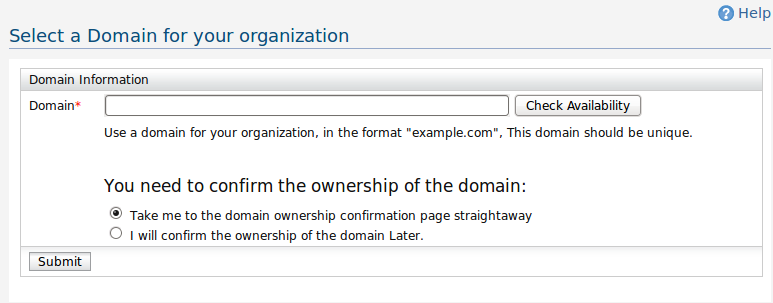
In order to identify your account, you have to provide the domain name of your organization. I will demonstrate how to create an account using the "ws.dimuthu.org" as my domain name.

1. First go to http://governance.cloud.wso2.com from a web browser and click the 'Register' button. You will be asked to enter the domain name as the first step.

[caption id="attachment_1036" align="aligncenter" width="773" caption="Enter the domain"]Enter the domain[/caption]

After that, you have the option of validating the ownership of the domain right at the registration process, or you can skip the validation and continue to the next step in which case your domain will be appended '-trial' suffix. You can validate the ownership of the domain later at any stage.

Here I want to validate the domain right now, so I click 'Take me to the domain ownership confirmation page straight-away' and click the 'Submit' button.

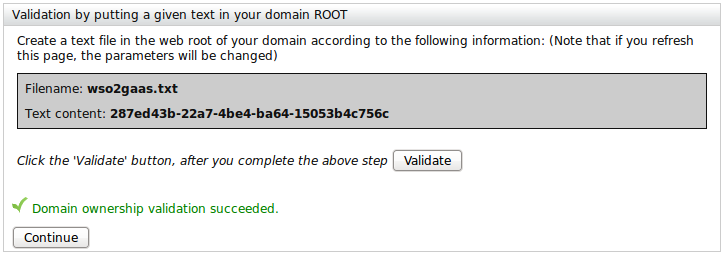
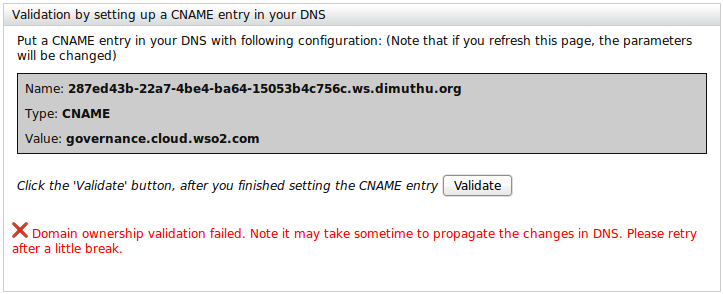
2. This will redirect you to the domain ownership validation page. You can validate the ownership of your domain in one of two ways.

Method i). Just create a text file named 'wso2gaas.txt' in the web root of your domain and enter the given text. This is the most simplest method of two.

[caption id="attachment_1039" align="aligncenter" width="722" caption="Validate domain name using Textfile"]Validate domain name using Textfile[/caption]

Method ii). You can put a DNS entry according to the given instructions. This is a little tedious approch to validate the domain. In fact it may take a while to propagate the new DNS information, so you may have to wait hours without refreshing the page until you finally validate the domain ownership.


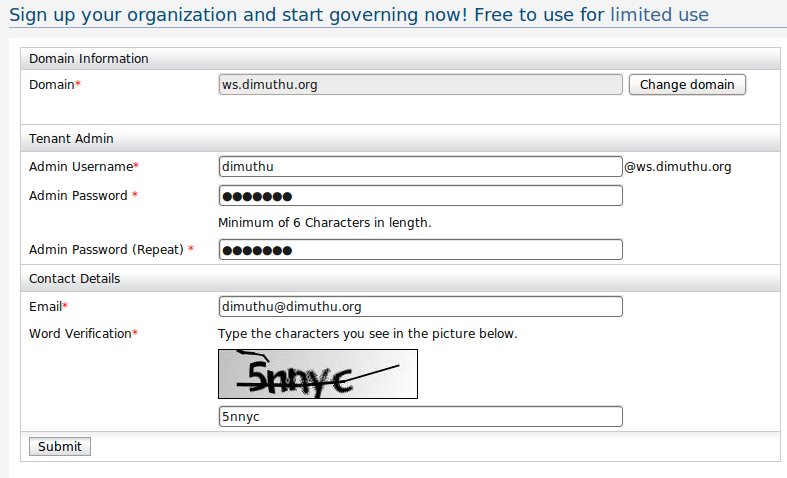
Click the continue button after the domain validation done. Then you will be redirected to a page requesting more information.

3. Tenant Registration Page

[caption id="attachment_1041" align="aligncenter" width="787" caption="Tenant Registration"]Tenant Registration[/caption]

4) After this step, you will be notified to check for your email which will contain a mail with a link to proceed with the registration. There you will be able to select a theme for your organization and finalize creating your account. Login to the admin account for your tenant with the credential you provided a the time of the registration.

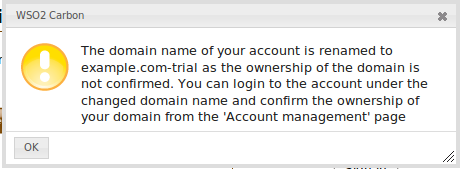
The domain ownership validation was introduced to WSO2 Governance as a Service account registration only now. So for organizations who have already have account will have a message similar to this when they are trying to login to their account.

[caption id="attachment_1046" align="aligncenter" width="460" caption="Info box at login"]Info box at login[/caption]

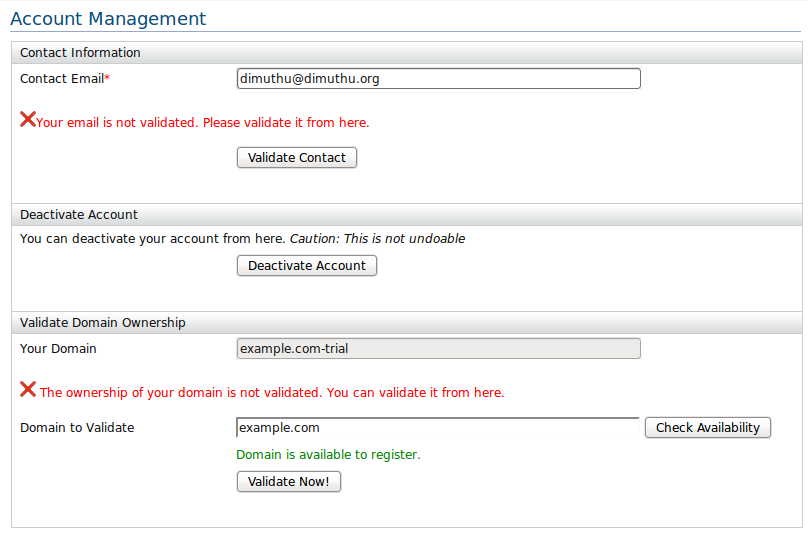
So the account I have registered using the domain name 'example.com' has been renamed to 'example.com-trial'. As the instruction of the message says you can go to the account management page after the login and validate the domain ownership.

[caption id="attachment_1043" align="aligncenter" width="808" caption="Account Management Page"]Account Management Page[/caption]

Thursday, November 19, 2009

WSO2 SOA Platform Enters in to the Cloud

WSO2 announced the launch of their SOA platform inside the Cloud earlier this week. With this launch, you can try out and use their comprehensive SOA platform inside the cloud.

WSO2 Cloud Platform consists of various products, including