WSO2 just released a newer version of the popular web services framework for php (WSF/PHP). It has lot of bug fixes + performance improvement. And it now support PHP 5.3. So you can use wsf/php with the latest php version.
You can download the new release from http://wso2.org/downloads/wsf/php.
Showing posts with label web services. Show all posts
Showing posts with label web services. Show all posts
Wednesday, July 07, 2010

Wednesday, May 19, 2010
PHP Web Services: Webinar From WSO2 And Zend
WSO2 and Zend jointly present a webinar titling "PHP Web Services: Why You Should Care" on 26th of May, 2010. The webinar will mainly focus on the following aspects,
• Understand Web services development best practices
• Discuss Web service myths and pitfalls
• Learn about prominent PHP Web services extensions
• Watch a demo of building Web Services with both the Zend Framework and WSO2 Web Services Framework for PHP.
You can find more information about the webinar and the link to registration here, http://wso2.org/library/webinars/2010/05/webinar-php-web-services-you-should-care.
• Understand Web services development best practices
• Discuss Web service myths and pitfalls
• Learn about prominent PHP Web services extensions
• Watch a demo of building Web Services with both the Zend Framework and WSO2 Web Services Framework for PHP.
You can find more information about the webinar and the link to registration here, http://wso2.org/library/webinars/2010/05/webinar-php-web-services-you-should-care.
Tuesday, January 05, 2010
Register Today for WSO2 Governance as a Service
WSO2 Governance as a Service is an online multi-tenant supported instance of WSO2 Governance Registry which is the solution for SOA Governance from the WSO2 SOA stack. You can start trying out WSO2 Governance as a Service by accessing the http://governance.cloud.wso2.com and creating an account for your organization (free for limited use).
In order to identify your account, you have to provide the domain name of your organization. I will demonstrate how to create an account using the "ws.dimuthu.org" as my domain name.
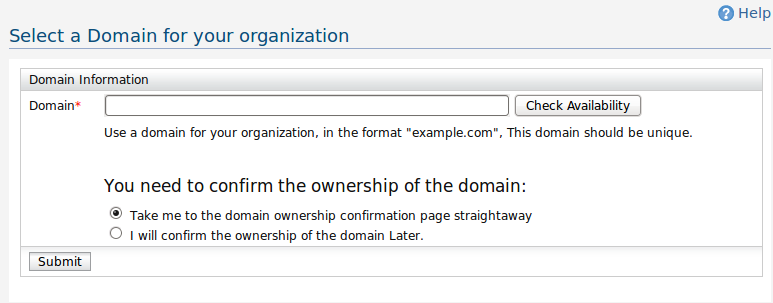
1. First go to http://governance.cloud.wso2.com from a web browser and click the 'Register' button. You will be asked to enter the domain name as the first step.
[caption id="attachment_1036" align="aligncenter" width="773" caption="Enter the domain"] [/caption]
After that, you have the option of validating the ownership of the domain right at the registration process, or you can skip the validation and continue to the next step in which case your domain will be appended '-trial' suffix. You can validate the ownership of the domain later at any stage.
Here I want to validate the domain right now, so I click 'Take me to the domain ownership confirmation page straight-away' and click the 'Submit' button.
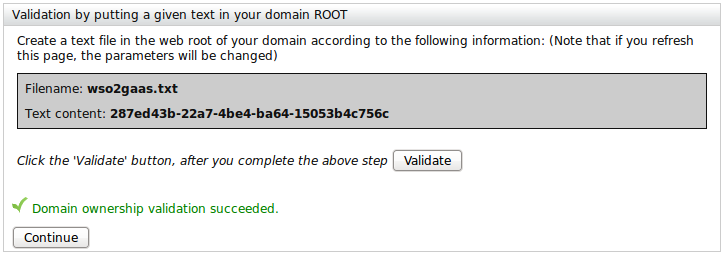
2. This will redirect you to the domain ownership validation page. You can validate the ownership of your domain in one of two ways.
Method i). Just create a text file named 'wso2gaas.txt' in the web root of your domain and enter the given text. This is the most simplest method of two.
[caption id="attachment_1039" align="aligncenter" width="722" caption="Validate domain name using Textfile"] [/caption]
Method ii). You can put a DNS entry according to the given instructions. This is a little tedious approch to validate the domain. In fact it may take a while to propagate the new DNS information, so you may have to wait hours without refreshing the page until you finally validate the domain ownership.

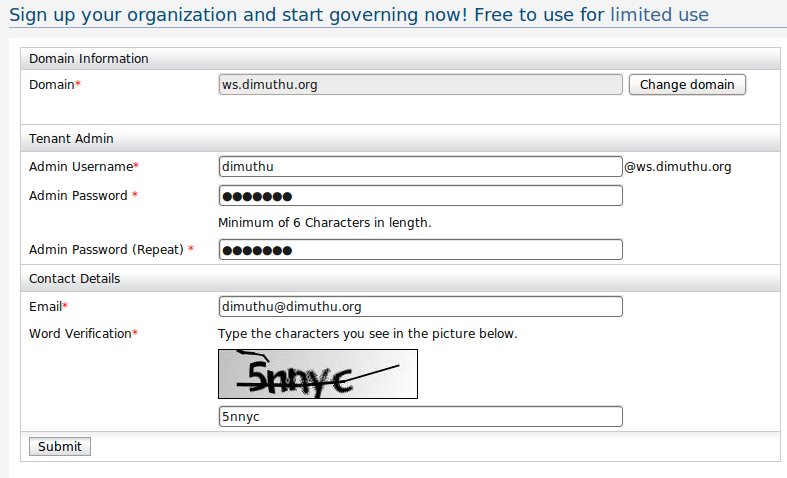
Click the continue button after the domain validation done. Then you will be redirected to a page requesting more information.
3. Tenant Registration Page
[caption id="attachment_1041" align="aligncenter" width="787" caption="Tenant Registration"] [/caption]
4) After this step, you will be notified to check for your email which will contain a mail with a link to proceed with the registration. There you will be able to select a theme for your organization and finalize creating your account. Login to the admin account for your tenant with the credential you provided a the time of the registration.
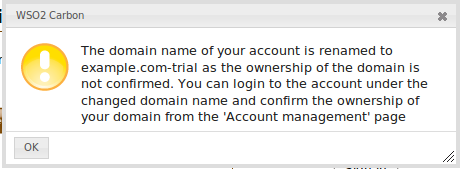
The domain ownership validation was introduced to WSO2 Governance as a Service account registration only now. So for organizations who have already have account will have a message similar to this when they are trying to login to their account.
[caption id="attachment_1046" align="aligncenter" width="460" caption="Info box at login"] [/caption]
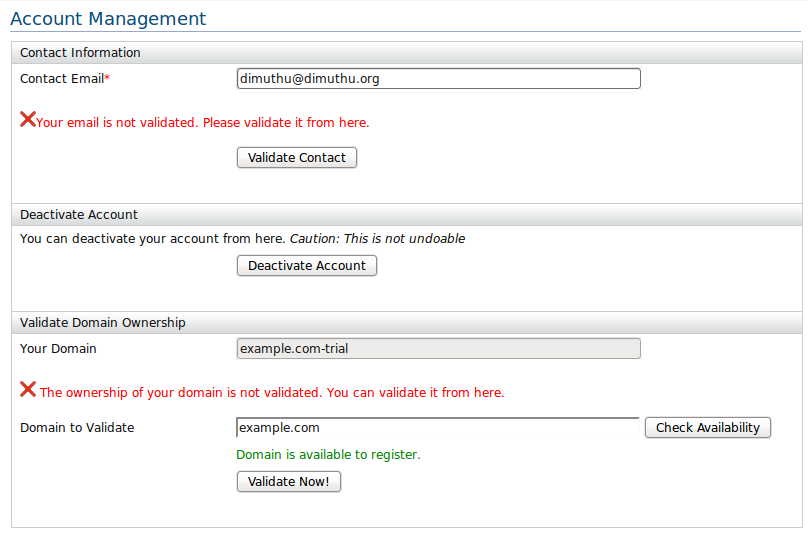
So the account I have registered using the domain name 'example.com' has been renamed to 'example.com-trial'. As the instruction of the message says you can go to the account management page after the login and validate the domain ownership.
[caption id="attachment_1043" align="aligncenter" width="808" caption="Account Management Page"] [/caption]
In order to identify your account, you have to provide the domain name of your organization. I will demonstrate how to create an account using the "ws.dimuthu.org" as my domain name.
1. First go to http://governance.cloud.wso2.com from a web browser and click the 'Register' button. You will be asked to enter the domain name as the first step.
[caption id="attachment_1036" align="aligncenter" width="773" caption="Enter the domain"]
 [/caption]
After that, you have the option of validating the ownership of the domain right at the registration process, or you can skip the validation and continue to the next step in which case your domain will be appended '-trial' suffix. You can validate the ownership of the domain later at any stage.
Here I want to validate the domain right now, so I click 'Take me to the domain ownership confirmation page straight-away' and click the 'Submit' button.
2. This will redirect you to the domain ownership validation page. You can validate the ownership of your domain in one of two ways.
Method i). Just create a text file named 'wso2gaas.txt' in the web root of your domain and enter the given text. This is the most simplest method of two.
[caption id="attachment_1039" align="aligncenter" width="722" caption="Validate domain name using Textfile"]
 [/caption]
Method ii). You can put a DNS entry according to the given instructions. This is a little tedious approch to validate the domain. In fact it may take a while to propagate the new DNS information, so you may have to wait hours without refreshing the page until you finally validate the domain ownership.
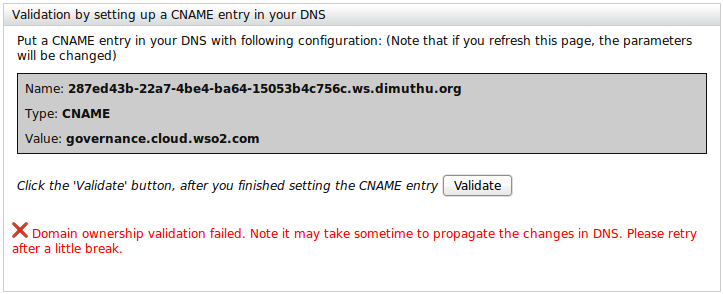
Click the continue button after the domain validation done. Then you will be redirected to a page requesting more information.
3. Tenant Registration Page
[caption id="attachment_1041" align="aligncenter" width="787" caption="Tenant Registration"]
 [/caption]
4) After this step, you will be notified to check for your email which will contain a mail with a link to proceed with the registration. There you will be able to select a theme for your organization and finalize creating your account. Login to the admin account for your tenant with the credential you provided a the time of the registration.
The domain ownership validation was introduced to WSO2 Governance as a Service account registration only now. So for organizations who have already have account will have a message similar to this when they are trying to login to their account.
[caption id="attachment_1046" align="aligncenter" width="460" caption="Info box at login"]
 [/caption]
So the account I have registered using the domain name 'example.com' has been renamed to 'example.com-trial'. As the instruction of the message says you can go to the account management page after the login and validate the domain ownership.
[caption id="attachment_1043" align="aligncenter" width="808" caption="Account Management Page"]
 [/caption]
Wednesday, December 02, 2009
Thursday, November 19, 2009
WSO2 SOA Platform Enters in to the Cloud
WSO2 announced the launch of their SOA platform inside the Cloud earlier this week. With this launch, you can try out and use their comprehensive SOA platform inside the cloud.
WSO2 Cloud Platform consists of various products, including
WSO2 Cloud Platform consists of various products, including
- WSO2 Cloud Virtual Machines: All WSO2 Java products are now available as
- Amazon Machine Images (AMIs). Visit the 'Getting Started' tutorial from Getting Started with WSO2 Cloud Virtual Machines for Amazon EC2
- VMWare/VMWare VSX and KVM images. Visit the tutorial, Getting Started with WSO2 VMWare Images.
- WSO2 Cloud Connectors:
- WSO2 Cloud Service Gateway - A manage and secured gateway between the services in your Enterprise and the cloud. Visit Introducing WSO2 Cloud Services Gateway for a comprehensive tutorial.
- WSO2 Service Accelerator - Accelerate the processing of WS-Security and WS-Reliable Messaging using WSO2 Web Service Framework for C++.
- WSO2 Cloud Services: Providing WSO2 Products as Services following the Software as a Service (SaaS) Model.
- WSO2 Governance as a Service: Hosted instance of WSO2 Governance Registry with multi-tenant support. You can try out the software from https://governance.cloud.wso2.com. Visit Getting Started With WSO2 Governance as a Service and FAQ for more information.
Tuesday, October 13, 2009
WSO2 Releases Goernance Registry 3.0.1, ESB 2.1.1, WSAS 3.1.1, IS 2.0.1 AND Mashup Server 2.0.0
WSO2 announced an another round of release of their famous SOA products.
Although the version numbers say this is minor patch release (Other than the Mashup Server which is shipping as a major release), in fact there are new features and improvements. Some basic new features shares among all of these products are
- WSO2 Governance Registry 3.0.1
- WSO2 ESB 2.1.1
- WOS2 Web Services Application Server (WSAS) 3.1.1
- WSO2 Identity Server (IS) 2.0.1
- WSO2 Mashup Server 2.0.0
Although the version numbers say this is minor patch release (Other than the Mashup Server which is shipping as a major release), in fact there are new features and improvements. Some basic new features shares among all of these products are
- Improved registry level transaction Support.
- Improved Support for deploying on top of Application Servers other than tomcat like WebSphere, WebLogic, and
JBoss. - Support for Eclipse P2 based provisioning. (Yes, you can add/remove features from these WSO2 products , see https://wso2.org/wiki/display/carbon/p2-based-provisioning-support for more details)
- Improved Remote Registry model
Monday, August 24, 2009
WSO2 Releases Eclipse IDE Tooling for WSAS and BPS
Saminda Wijerathna the lead of the WSO2 tooling team, announced the release of a new version of IDE tools for WSO2 WSAS and BPS. These tools will help you to write web services or web service clients and test them within your Eclipse IDE.
You can download the tools and the related documentation from http://wso2.org/downloads/tools/eclipse.
Here are the key features of the set of IDE tools,
You can download the tools and the related documentation from http://wso2.org/downloads/tools/eclipse.
Here are the key features of the set of IDE tools,
- Create Web services
- Create web service client
- Convert WSDL 1.1 to 2.0
- Module and service validators
- Creating wsdl from a java class
- Create Axis2 archives
- Hot update a Web service
- Debug Web services
- Test Web services
- Conversion of WSDL 1.1 to 2.0 can now be done vice versa as well.
- Creating Bpel archives for deploy
- Start WSAS 3.0.x inside Eclipse
- Run multiple instances of WSAS inside eclipse
Wednesday, July 29, 2009
WSO2 Releases Web Service Framework For C++
WSO2 announced the release of the Web Services Framework for C++ (WSF/C++) version 2.0.0. Similar to WSF/PHP which is really popular among the PHP community, WSF/CPP is the C++ language binding for the Apache Axis2/C and the other supporting web services projects like Apache Sandesha/C, Apache Rampart/C.
With this release C++ developers will be able to write web services and web service clients to inter-op with .NET/Java/PHP or any other platform built-on web service standards. The release is shiped with a code generation tool that will be used to generate the code for skeletons and stubs from a WSDL, so developers only need to concentrate on their business logic as the generated code will take care of building or parsing xmls and running them on top of the framework.
Here are the key features of the new release.
As a side note, you will be able to participate to a free summer school training session on the WSF/CPP conducted by Nandika Jayawardane who is the project lead of both WSF/CPP and WSF/PHP on 30th July. You can register to it (for free) from here.
With this release C++ developers will be able to write web services and web service clients to inter-op with .NET/Java/PHP or any other platform built-on web service standards. The release is shiped with a code generation tool that will be used to generate the code for skeletons and stubs from a WSDL, so developers only need to concentrate on their business logic as the generated code will take care of building or parsing xmls and running them on top of the framework.
Here are the key features of the new release.
- Support core web service standards like SOAP 1.1, SOAP 1.2, WSDL 1.1, WSDL 2.0, REST
- Support for web services QoS specifications.
- WS-Addressing
- WS-Security
- WS-Policy
- WS-Security-Policy
- WS-Reliable-Messaging
- Support binary attachment with MTOM and SWA (With the Support for large binaries)
- Code generation tool.
- Proven interoperability with .NET.
As a side note, you will be able to participate to a free summer school training session on the WSF/CPP conducted by Nandika Jayawardane who is the project lead of both WSF/CPP and WSF/PHP on 30th July. You can register to it (for free) from here.
Saturday, July 11, 2009
WSO2 Carbon 2 - WSAS, ESB & Governance Registry Released
WSO2 -An open source middleware company- announced the release of bunch of their SOA enabling products along with Carbon 2.0.0 which is an OSGI based unified platform that all the WSO2 java products are built on.
You will be able to get the advantage of the carbon platform by extending the functionality of any of these products, just by mixing components from other products (Just like running an ESB within WSAS).
Download, Play around with them and Enjoy:)!!!
- WSAS (Web Service Application Server) - Provide and consume web services, data services with full WS-*, REST support, GUI tools, Integration with Eclipse, etc..
- ESB (Enterprise Service Bus) - Message routing, mediation, transformation, logging, task scheduling, load balancing, failover routing, event brokering, etc. with number of transports support
- Governance Registry - Govern you SOA platform, introducing number of new features including Dashboard with Gadgets, lifecycle management with checklists, eventing and notifications, remote/symbolic links, checkin/checkout functionality and new meta data management UI.
You will be able to get the advantage of the carbon platform by extending the functionality of any of these products, just by mixing components from other products (Just like running an ESB within WSAS).
Download, Play around with them and Enjoy:)!!!
Subscribe to:
Comments (Atom)

